The Wellness Journal
Why does my Sydney appointment show a different time in my calendar?
Published 14 November 2026
Wellness n Co JournalA different calendar time does not always mean your appointment has moved. The same event can appear in different local time zones. Before changing it, compare the provider’s latest confirmation with the calendar entry: check the date, appointment location and time zone, not just the number beside the clock.
If those details still disagree, ask the provider to confirm the appointment in Sydney local time. Do not guess which display is correct or make a second booking to solve the discrepancy.
Start with the confirmation, not the reminder
Open the latest confirmation you received and find the appointment date, time, location and booking reference. Check whether a later message changed any of those details. An older email and a newer calendar invitation may describe different arrangements.
Write down what each source actually says. For example: “Confirmation: 18 November, 10 am, Sydney. Calendar: 18 November, 9 am, time zone not yet checked.” This makes the question clear without deciding prematurely that either entry is wrong.
If the confirmation does not identify the time zone, ask. A bare “10 am” is not enough to settle a disagreement when you are travelling interstate or overseas. The useful answer is the date and local time at the appointment location.
One appointment can have two clock readings
Google explains that events can appear in the local time zones of the people viewing them. Travel can also change the time displayed in your calendar. That is a display difference, not necessarily a change to the underlying event. See Google’s explanation of calendar time zones.
Here is a fictional example for 18 November 2026:
| Display | Time shown |
|---|---|
| Appointment in Sydney | 10 am AEDT |
| Same moment viewed in Brisbane local time | 9 am AEST |
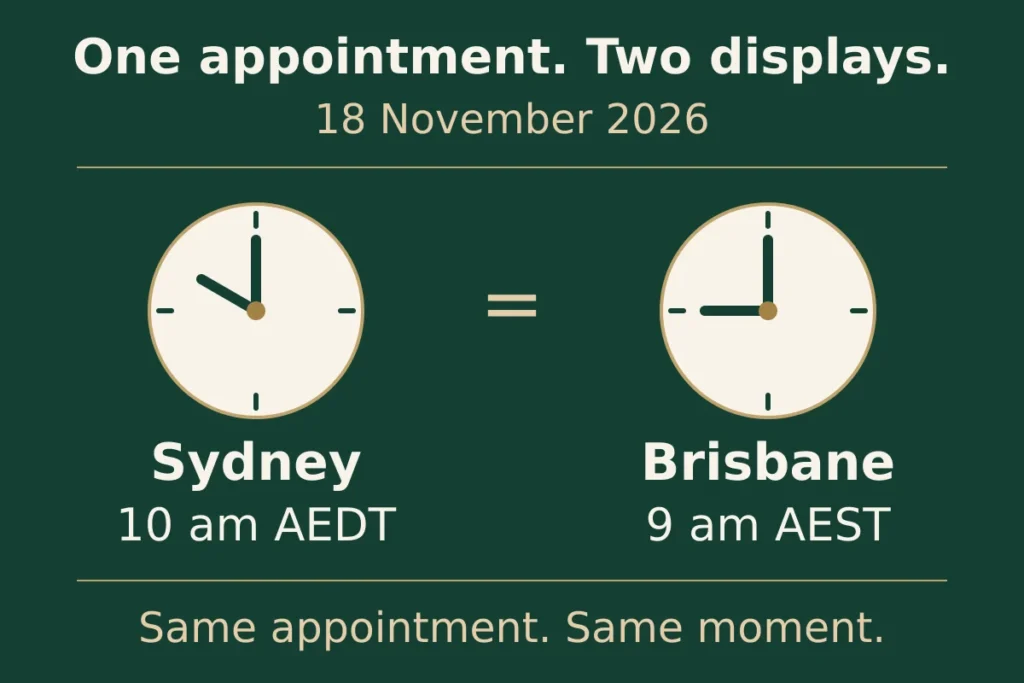
Both readings describe the same moment on that date. However, an appointment actually arranged for 9 am in Sydney would be a different booking. That is why the location and zone matter as much as the displayed hour.
Treat this as an illustration, not a permanent conversion rule. Check the actual appointment date before applying a time difference to another trip.
Check the date around daylight saving
Sydney observes daylight saving, while Queensland does not. The NSW Government’s daylight-saving page lists the current transition dates: clocks moved forward on 4 October 2026, and move back on 4 April 2027.
In Sydney, the October transition advances 2 am AEST to 3 am AEDT. The April transition returns 3 am AEDT to 2 am AEST. An interstate time difference that worked for a summer appointment may therefore be wrong for a winter one.
For future bookings, use the city and appointment date rather than assuming Sydney has one fixed offset all year. If an invitation describes an unusual overnight time on a transition date, ask the organiser to clarify it instead of manually applying an hour’s adjustment.
Inspect the calendar settings without changing the booking
For Google Calendar on a computer, the relevant display setting is under Settings → General → Time zone → Primary time zone. You can also inspect an event’s time-zone field beside its time in the editing view. Follow Google’s current instructions, since available controls depend on the calendar and your permissions.
Inspect first. Avoid saving changes simply to make two displays look alike. Changing an event’s zone or time is different from understanding why it is displayed that way.
For another calendar app, use that app’s own help rather than assuming Google’s menu names apply. If you cannot find the zone, send the provider the conflicting date and time in words. You do not need to share your full calendar or a screenshot containing other appointments.
Resolve the mismatch before setting your day around it
Once you have checked the confirmation and calendar, use a short message such as:
“Could you confirm that booking [reference] is on [date] at [time] Sydney local time? My calendar currently shows [time]. Has the appointment changed, or is this a time-zone display difference?”
Use the provider’s established contact channel. If you receive a revised confirmation, keep it with the earlier correspondence so the change is traceable. Check whether an older personal reminder also needs updating, rather than leaving two unexplained entries in your calendar.
Do not assume that editing your personal calendar reschedules the provider’s appointment. Ask for confirmation of any actual change. Equally, do not cancel an invitation simply because the displayed hour looks unfamiliar before you have checked what it represents.
Make the arrival plan match the confirmed time
For a hotel visit, reconciling the time is only one part of planning. Check that you will have access to the room or agreed location at the confirmed appointment time. Our Sydney hotel appointment planning checklist covers permission, reception access and check-in arrangements separately.
Keep the confirmed date, Sydney local time and address together in a place you can find easily. Our guide to organising appointment documents explains how to keep confirmations distinct from receipts and other records.
Before the day, make one final comparison: the provider’s current confirmation, the calendar event and your arrival plan should describe the same appointment. If they do not, resolve the difference with the provider rather than relying on a reminder alone.
Sources and calendar instructions checked 14 November 2026. The worked example is fictional and does not represent an available appointment or a feature of our booking software.